
The iPad, Apple’s iconic tablet, has evolved over the years, offering an array of features and capabilities that cater to a wide range of users. If you’ve acquired an iPad but aren’t quite sure which model it is, fear not! In this article, we’ll guide you through various methods to identify your iPad model accurately. Whether you’re a new iPad owner or have had one for years, knowing your iPad model is essential for troubleshooting, compatibility, and even selling your device.
Check the Model Number in Settings
One of the easiest ways to identify your iPad model is by checking the device’s settings. Follow these steps:
Unlock your iPad and go to the Home screen.
Tap on “Settings,” which is represented by a gear icon.
Scroll down and select “General.”
In the General menu, tap on “About.”
Look for the “Model” or “Model Number” section.
You’ll find a code starting with the letter “A” followed by four numbers (e.g., A1234). This alphanumeric code is unique to your iPad model.
Inspect the Back of Your iPad
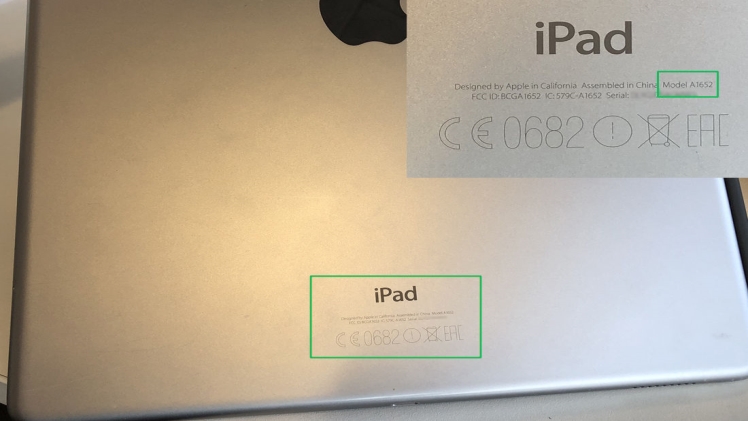
If you don’t have access to the settings or the iPad is not functioning correctly, you can identify the model by examining the back of the device. Here’s how:
Flip your iPad over to reveal the back.
Near the bottom, you’ll see some small text.
Look for the “Model” label, followed by the model number, which starts with the letter “A.”
The model number on the back of your iPad can be used to identify its specific version.
Compare Physical Characteristics
Different iPad models have distinct physical characteristics that can help you determine which one you have. These features include:
Size: Measure the physical dimensions of your iPad, including the screen size. For instance, the iPad Mini has a smaller screen than the standard iPad.
Home Button: Some iPads have a physical home button, while newer models have eliminated it in favor of Face ID or Touch ID.
Camera: Check the camera configuration, noting the presence of a front and rear camera and their placement.
Connector Type: Observe the charging port. Older iPads use the 30-pin connector, while newer ones use the Lightning connector.
Speaker Grilles: The arrangement and number of speaker grilles on the iPad’s edges can vary by model.
By comparing these physical characteristics with known iPad models, you can narrow down your device’s identity.
Look Up Your Model Number Online
If you have your iPad’s model number (the alphanumeric code starting with “A”), you can easily find detailed information about your device online. Simply perform a web search with the model number, and you’ll find resources such as Apple’s official support pages or third-party websites that provide specifications, release dates, and other details specific to your iPad model.
Use Apple’s Official “Check Coverage” Tool
Apple’s official website offers a “Check Coverage” tool that not only helps you identify your iPad model but also provides information about your device’s warranty status and eligibility for support and repairs. Here’s how to use it:
Visit the Apple “Check Coverage” webpage (https://checkcoverage.apple.com/).
Enter the serial number or IMEI of your iPad, which you can find in the Settings app under “General” > “About.”
Apple’s tool will display information about your device, including the model.
Consult Apple Support
If you’re still having trouble identifying your iPad model, or if you suspect it may be a rare or less common version, consider reaching out to Apple’s official support channels. Apple’s support team can assist you in determining the model based on the information you provide.
Check the Original Packaging
If you have the original packaging for your iPad, it typically contains information about the model. Look for a label or sticker on the packaging that displays the model number and other relevant details.
Why Identifying Your iPad Model Matters
Knowing your iPad model is beneficial for several reasons:
Compatibility: Identifying your iPad model ensures you purchase compatible accessories, apps, and software updates.
Troubleshooting: When seeking help with technical issues, knowing your iPad model helps support personnel provide more accurate assistance.
Resale Value: If you plan to sell or trade in your iPad, potential buyers or trade-in services will want to know the model for valuation purposes.
Warranty and Repairs: Different iPad models may have varying warranty coverage and repair options. Identifying your model helps determine eligibility for repairs and service.
Conclusion
Your iPad model is more than just a number; it’s the key to unlocking the full potential of your device. By using the methods outlined in this article, you can confidently identify your iPad model and access the information you need for compatibility, troubleshooting, and even selling or trading in your device. Stay informed about your iPad, and you’ll be better equipped to make the most of this versatile and powerful tablet.
